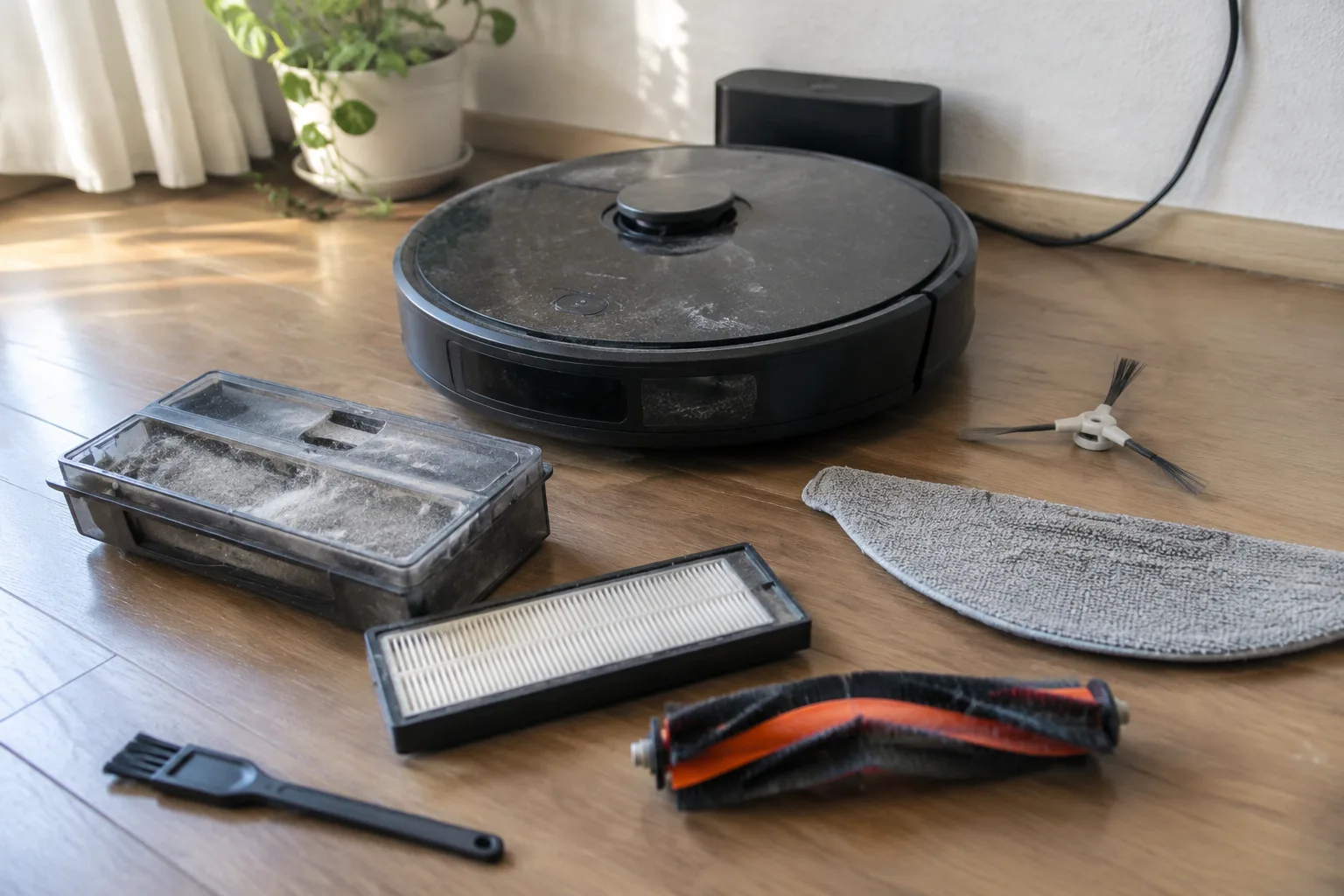
A robot vacuum is a small machine with a large appetite for neglect. It will run for months on the same crusted brush and the same clogged filter, and it will do so patiently, quietly losing suction the whole time. Then one afternoon it stops in the middle of the kitchen floor with a red light and a message that reads like a ransom note, and the owner discovers that the warranty does not cover a motor killed by fine grit.
The maintenance schedule for these machines is genuinely short. Most of it takes under ten minutes a week. The problem is that almost nobody tells a new owner which ten minutes matter, so the work gets skipped until something fails.
What follows is a working checklist, ordered by how often each task actually needs doing. It assumes a typical household: a mix of hard floor and low-pile carpet, one or two shedding mammals, and a machine that runs most days.
The brush roll is a hair magnet and the first thing to fail
Long hair wraps around a spinning brush roll the way twine wraps around a spool. The roll keeps turning for a while, then starts to thump, then trips the overload sensor and stops. The fix is mechanical and takes about two minutes: flip the machine over, pull the roll out (most models release it with a tab or a coin twist), and cut the hair free with scissors or a seam ripper.
Scissors work better than pulling. Pulling stretches the bristles and can bend the axle. A seam ripper is the better tool if one lives in the sewing kit, because the small hook slides under the wound hair without nicking the rubber.
This is a weekly job in a house with long-haired residents. In a household of short hair and no pets, once a month is plenty. The first sign that it has gone too long is a faint burning smell, which is the motor working harder than it should.
The filter is where suction actually dies
Every robot vacuum pulls air through a filter, and every filter eventually loads up with the fine dust that a vacuum is supposed to capture. A loaded filter is the single most common cause of "it doesn't pick up like it used to." The machine sounds fine. The battery is fine. The bin is empty. The suction is just gone.
Most machines use one of two filter types: a washable mesh-and-foam stack, or a pleated HEPA-style cartridge. Washable filters get rinsed under a tap every two to four weeks and must dry completely, and this matters more than people expect. A damp filter breeds odor and can damage the motor. Twenty-four hours on a windowsill is the safe minimum.
Pleated cartridges are not meant to be washed. They get tapped clean against a bin edge every couple of weeks and replaced every few months, depending on how much dust the house produces. A cartridge that has gone grey-brown across the whole pleat is done. Trying to stretch another month out of it is a false economy.
Emptying the bin is not the same as cleaning it
The bin gets emptied after every run, or every other run in a clean house. What gets skipped is the rinse. Fine dust cakes onto the inside walls and around the inlet, and over time that cake narrows the airflow path.
Once a month, the bin comes out, gets rinsed with plain water, and dries fully before it goes back. No soap, because residue attracts dust. The clear plastic should be clear enough to see through. When it starts looking frosted, that is the dust film.
Sensors need a dry cloth more often than owners think
Robot vacuums navigate with a small suite of sensors: cliff sensors on the underside, bumper sensors along the front edge, and often a camera or lidar puck on top. Each of these is a window, and each window gets dusty.
A dusty cliff sensor is the classic cause of a machine that refuses to leave a rug or stops at the edge of a threshold for no apparent reason. It thinks it is about to fall. A quick wipe with a dry microfiber cloth, every week or two, solves it.
Skip the wet wipes on sensor windows. A smear of cleaning residue on a lidar puck is worse than a layer of dust, because it refracts the beam in unpredictable ways.
The charging contacts corrode quietly
Two metal pads on the underside of the robot meet two spring-loaded pins on the dock. Over months, those pads pick up a thin film of oxidation and dust, and the machine starts missing its dock or charging slowly. The symptom looks like a battery problem. It is usually a contact problem.
A pencil eraser rubbed gently across both sets of contacts, once a month, restores a clean connection. A dry cloth afterward removes the eraser crumbs. This is the cheapest fix in the entire checklist and the one most often missed.
Side brushes bend and then stop sweeping
The three-armed side brush that flicks debris out of corners is the most disposable part on the machine. Its bristles splay outward after a few months, until they flatten against the floor and stop reaching into the corner at all. The machine still runs. The corners just stop getting clean.
Bristles can be revived for a while by soaking the brush head in warm water for ten minutes, which lets them relax back toward their original shape. Once they stay splayed, a replacement set costs a few dollars and takes thirty seconds to snap on. Buying a spare set at the same time as the machine is the practical move.
Wheels collect hair on the axle, not the tread
The drive wheels look fine from above. The problem is underneath, where hair winds around the axle between the wheel and the housing. Enough of it and the wheel drags, the machine veers, and the navigation map starts coming out crooked.
Once a month, spin each wheel by hand. It should turn freely and quietly. A gritty feel or a squeak means hair is packed in. Tweezers pull it out. On some models the wheel pops off with a firm pull, which makes the cleaning much easier.
Firmware updates fix navigation bugs that look like hardware faults
A machine that suddenly starts bumping into the same chair leg it has avoided for a year is often running old firmware. Manufacturers push navigation fixes through app updates, and those updates only land if the app is opened and the machine is on its dock with a decent charge.
Checking the app once a month for an available update takes less time than watching the machine circle a table leg. This is the one maintenance task that lives entirely in software, and it is easy to forget because nothing physical needs cleaning.
The dock has its own dust problem
Self-emptying docks have a suction port and a bag or canister that fills with whatever the robot dumps into it. That bag needs checking every month or two. A full bag backs up the port, and the robot's bin stops emptying properly, which quietly reduces cleaning performance on every subsequent run.
The dock's interior also collects a ring of dust around the port opening. A dry cloth around that ring, every few weeks, keeps the seal tight. A poor seal means the dock sucks weakly, and the robot's bin stays half full.
A short schedule that actually gets followed
The maintenance that gets done is the maintenance that fits into an existing habit. Tying the tasks to the machine's own rhythm works better than a calendar reminder that gets dismissed.
Weekly: cut hair off the brush roll, wipe the sensors, check the wheels for winding hair. Every two to four weeks: rinse the washable filter and let it dry a full day, wipe the charging contacts with an eraser, rinse the bin. Every few months: replace the pleated filter, check the dock bag, inspect the side brushes for splay.
That is the whole list. Ten minutes a week keeps a robot vacuum running at the suction it had on day one. The alternative is a machine that slowly degrades in ways the owner never notices until the day it stops, and by then the repair usually costs more than the discipline would have.


